

By Blaise Pierce | Marketing & Digital Experience Specialist, Doing Better Business
Digital displays are everywhere.
We see them in businesses, schools, convention centers, museums, retail stores, restaurants and events. But there is a big difference between a display that simply shows information and one that invites people to interact with it.
That is where interactive digital signage changes the experience.
Instead of presenting the same information to everyone who walks by, an interactive display allows people to choose what they want to see, find the information they need and engage with a space on their own terms.
The screen is no longer something people simply look at.
It becomes something they use.
What Is Interactive Digital Signage?
At its simplest, interactive digital signage allows someone to interact with digital content and receive a response based on what they select.
Think about the difference between a traditional digital sign and an interactive kiosk.
A traditional sign might display:
Conference Room A →
An interactive kiosk could allow a visitor to search for a meeting, select a destination, view a map, get directions, browse the day’s schedule or even explore restaurants and attractions nearby.
The screen isn’t simply communicating with the visitor.
The visitor is communicating with the screen.
That is what separates interactive technology from traditional digital signage. A traditional display generally delivers a predetermined message. Interactive technology gives the person standing in front of the screen some control over what happens next.
How Does Interactive Digital Signage Work?
Creating a useful interactive experience takes more than putting a touchscreen on a wall.
Several pieces need to work together.
The display provides the visual interface.
The interactive interface allows users to select menus, buttons, maps, images, products or other information directly on the screen.
The media player and software deliver the content and respond to the user’s selections. Digital signage technology such as BrightSign can provide the platform behind these experiences.
The content determines what the visitor can actually do. That could include maps, directories, videos, product information, event schedules, educational material, menus, forms, games or other digital experiences.
Content management allows organizations to update and schedule information without manually changing every individual display.
The most important part is how all of those pieces work together.
Because the goal isn’t to install a touchscreen.
The goal is to create an experience that is useful to the person standing in front of it.
Where Can Interactive Technology Be Used?
One of the advantages of interactive digital signage is how many different problems it can solve.
The experience can be completely different depending on the environment and what the organization wants visitors, customers, students or employees to accomplish.
Colleges and Universities
Large campuses can be difficult to navigate, especially for first-time visitors.
An interactive kiosk can become a digital campus guide, allowing students and visitors to search for buildings, departments, parking, dining options, faculty offices and upcoming events.
It can also solve another problem: keeping information current.
Events change. Offices move. Schedules get updated.
Digital content can be changed without replacing printed maps or rebuilding physical signage.
But campuses can go much further than wayfinding.
Interactive displays can also be used for donor recognition, athletics, recruiting, campus history, student orientation and immersive experiences that help tell the institution’s story.
Convention Centers
Convention centers are a natural fit for interactive technology.
Visitors need to find events, meeting rooms, exhibitors, food and beverage options and other areas throughout the facility.
Interactive wayfinding can allow someone to search for a specific meeting or destination and receive directions instead of trying to interpret a large static map.
But why stop at the front door?
A convention center can also help visitors discover what is happening outside the facility.
Interactive displays can introduce attendees to local restaurants, attractions, shopping, entertainment and other businesses in the surrounding community.
The kiosk becomes more than wayfinding.
It becomes a digital discovery point.
A Real-World Example: Blair County Convention Center
At the Blair County Convention Center in Altoona, Pennsylvania, AVyze! recently brought this concept to life with an interactive experience designed and developed by Blaise Pierce, Doing Better Business Marketing & Digital Experience Specialist.
Using BrightSign technology, Blaise built the interactive experience to help visitors navigate the Convention Center while also giving them an opportunity to discover local businesses and attractions throughout the area.
And the project didn’t end when the display went live.
Because the experience is digital, Blaise continues to work with the Convention Center to enhance the platform, make changes and add functionality as their needs evolve.
That’s an important part of interactive technology that can easily be overlooked. The goal isn’t simply to install a screen and walk away. The experience can continue to grow and change based on how people use it and what the organization wants to accomplish next.
That’s the difference between installing digital signage and creating a digital experience.
Restaurants, Breweries and Hospitality
Imagine walking into a brewery and seeing an interactive display that lets you browse the current beer selection.
Tap a beer and you could see its style, tasting notes, ingredients and suggested food pairings.
Restaurants could offer interactive menus, event information, promotions or loyalty programs. Hotels could use interactive displays to provide property information, meeting schedules, local recommendations and directions.
Instead of trying to fit everything onto one printed menu or static display, customers can explore the information that interests them.
Museums and Cultural Institutions
Interactive technology can help visitors explore exhibits at their own pace.
Someone viewing a historical exhibit might tap different people, locations or events to learn more, explore a timeline, watch a video, view historical photographs or listen to an audio recording.
Art museums can provide additional information about artists and individual works. Science museums can incorporate simulations and educational activities to help explain complex topics.
The technology doesn’t need to replace the exhibit.
It can help visitors go deeper into it.
Retail
Interactive displays can give shoppers access to information even when an employee isn’t immediately available.
Customers might browse products, compare features, explore available colors or configurations, view specifications, watch demonstrations or discover related products.
Instead of overwhelming a customer with information all at once, interactive technology lets the customer decide what they want to explore.
Trade Shows and Events
At a trade show, you have limited space and limited time to get someone’s attention.
An interactive display gives attendees a reason to stop and engage.
Visitors could browse products and services, explore case studies, watch demonstrations, complete a quiz, enter a giveaway, request a meeting or learn about different areas of your organization.
Instead of handing someone a brochure and hoping they read it later, you’re allowing them to explore what interests them right now.
And the investment doesn’t necessarily end when the trade show does.
The same interactive content could potentially be adapted for a showroom, lobby, customer experience center or another event.
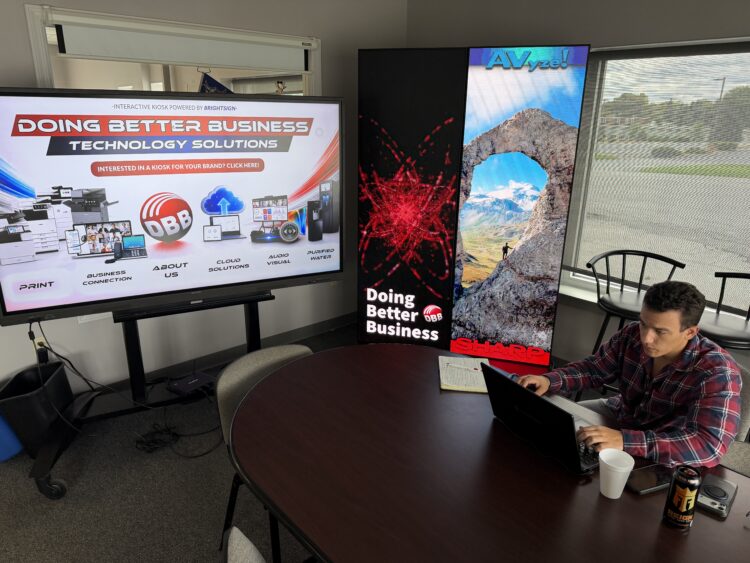
BrightSign: Powering Interactive Digital Experiences
The display is what people see, but there is a lot happening behind it.
BrightSign digital signage players can provide the technology needed to deliver content and support interactive applications, from straightforward digital signage to more customized interactive experiences.
For organizations managing multiple displays, BrightSign can also provide a way to manage and update digital signage experiences across different locations.
That scalability matters.
An organization might begin with one interactive kiosk in a lobby and eventually expand the concept to additional buildings, departments or locations.
And because the content is separate from the physical display, the screen itself doesn’t have to change every time the information changes.
The content—and the experience—can evolve as the organization’s needs evolve.
That is why the conversation about interactive technology shouldn’t begin with:
“What screen should we buy?”
It should begin with:
“What do we want people to be able to do?”
Once you know the answer to that question, you can design the technology around the experience.
Frequently Asked Questions About Interactive Digital Signage
What is the difference between digital signage and interactive digital signage?
Traditional digital signage typically displays predetermined content for people to view. Interactive digital signage allows the user to make selections, search for information, navigate content or otherwise control part of the experience.
What can an interactive kiosk be used for?
Interactive kiosks can be used for wayfinding, directories, event schedules, product information, menus, educational content, visitor information, local attractions, donor recognition and many other applications.
Can interactive digital signage be updated remotely?
Depending on the technology and content management platform being used, digital signage content can be centrally managed and updated without physically visiting each display.
What industries use interactive displays?
Interactive technology can be used in education, hospitality, convention centers, museums, retail, corporate environments, healthcare, government facilities, trade shows and many other settings.
What technology is needed for an interactive kiosk?
The exact solution depends on what you want the kiosk to accomplish, but an interactive experience can include a commercial display or touchscreen, media player, software, content management system, network connectivity and the content itself.
That’s why defining the experience first is so important.
The Future of Digital Signage Isn't Just About What People See
Interactive technology changes the role of a digital display.
Instead of simply telling people something, the display can help them find, explore, choose, learn and engage.
A college can help students navigate campus.
A museum can bring an exhibit to life.
A convention center can help visitors find their meeting and then discover the surrounding community.
A retailer can help customers explore products.
A restaurant can give customers more information.
A trade show exhibitor can turn a passerby into an engaged visitor.
The possibilities are largely determined by the environment and the experience you want to create.
And that is ultimately the most important thing to remember:
The technology isn’t the experience. It enables the experience.
Ready to Make Your Displays More Interactive?
Have an idea for an interactive display, kiosk, wayfinding system or digital experience?
AVyze! Audio Visual Integration, a division of Doing Better Business, can help you think through the entire experience—from the display and interactive technology to the software, content and AV infrastructure behind it.
Before you invest in hardware, let’s talk about what you actually want people to be able to do.
About the Author
Blaise Pierce is a Marketing Digital Experience Specialist at Doing Better Business. Combining creative content development with hands-on technical expertise, Blaise designs and builds interactive digital experiences using BrightSign technology.
Most recently, Blaise developed the interactive experience at the Blair County Convention Center, creating a platform that helps visitors navigate the facility while also discovering local businesses and attractions throughout the area. He continues to manage and enhance the experience as the Convention Center’s needs evolve.
Working alongside the AVyze! Audio Visual Integration team, Blaise brings a unique perspective to digital signage: he understands both the technology behind the screen and the content and user experience that make people want to interact with it.
His focus isn’t simply on what appears on the screen—it’s on what people can do with it.