

“What Happens When You Turn On WPP?”
Simple flowchart:
WPP Enabled
↓
Microsoft activates Windows Protected Print Mode using IPP-based printing
Legacy Print Drivers Removed
↓
Traditional third-party print drivers and TCP/IP queues are deleted
IPP Printing Activated
↓
Windows switches to Microsoft’s secure IPP Class Driver architecture
Some Advanced Features May Break
↓
Stapling, tray selection, secure release, accounting codes, and finishing options may no longer function properly
Organizations Often Attempt to Disable WPP
↓
Turning WPP off does NOT restore your previous print environment
All Print Drivers Must Be Reinstalled
↓
Print queues, drivers, and deployment configurations may need to be rebuilt manually
Print Support Apps (PSAs) Become Required
↓
PSAs help restore advanced print functionality within the new WPP framework
More Secure Print Environment
↓
Reduced attack surface, lower system privileges, and improved Zero Trust alignment
Windows Protected Print Mode (WPP): What Organizations Need to Know Before Enabling It
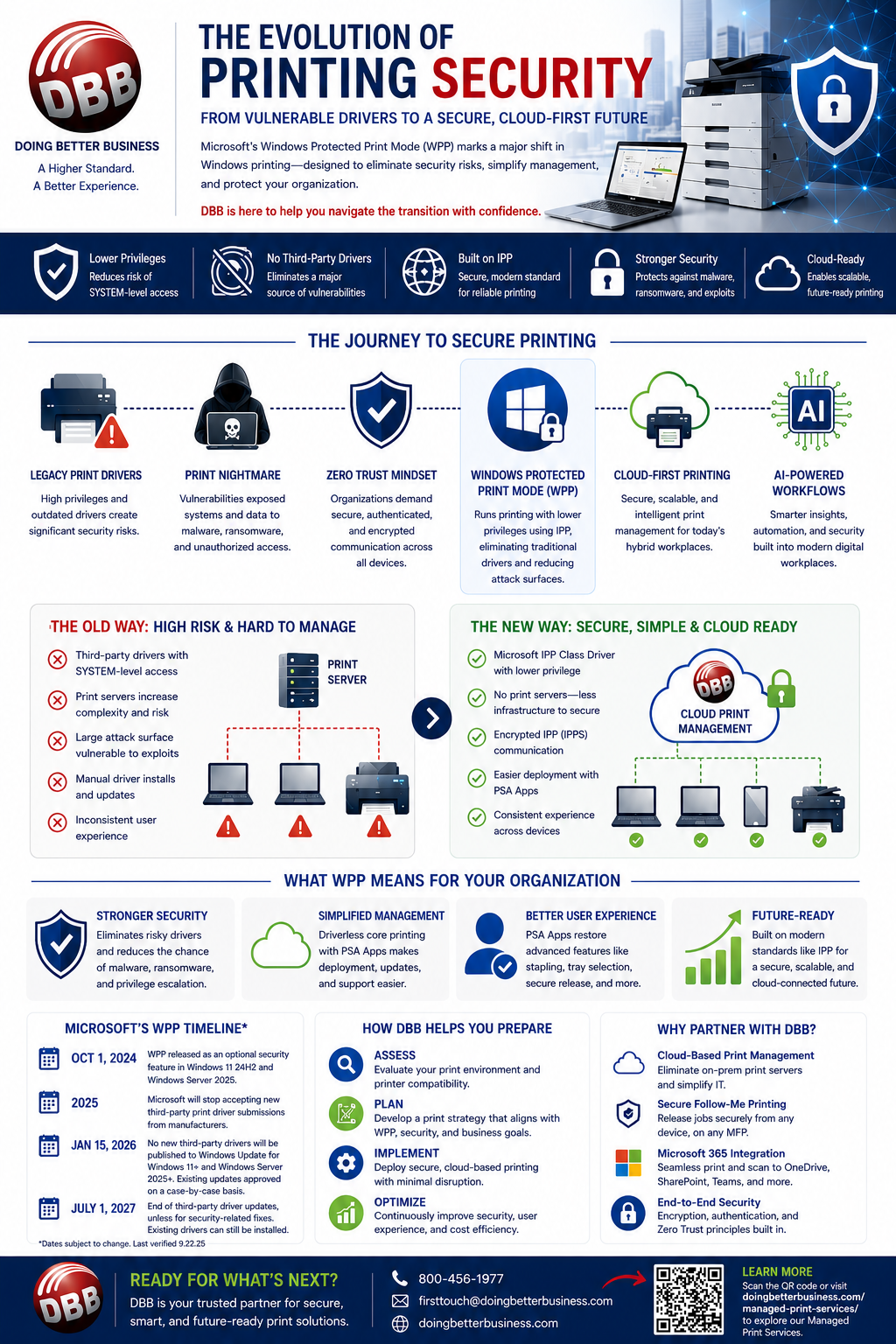
Microsoft’s introduction of Windows Protected Print Mode (WPP) is reshaping the future of enterprise printing. Designed to eliminate print driver vulnerabilities and modernize the Windows print stack, WPP introduces a more secure, driverless printing environment built around the Internet Printing Protocol (IPP).
For IT leaders and business decision-makers, the question is no longer if Windows printing will change — but whether your organization is prepared for the transition.
At Doing Better Business, we are helping organizations understand the benefits, limitations, and real-world impact of WPP so they can make informed decisions about print security and infrastructure modernization.
What Is Windows Protected Print Mode (WPP)?
Windows Protected Print Mode (WPP) is Microsoft’s new security-focused printing architecture introduced with:
- Windows 11 24H2
- Windows Server 2025
WPP modernizes printing by:
- Eliminating traditional third-party print drivers
- Leveraging Microsoft’s built-in IPP Class Driver
- Blocking legacy print modules and providers
- Running print operations with lower system privileges
- Reducing print spooler attack surfaces
Instead of relying on manufacturer-specific drivers from companies like Canon, Ricoh, Sharp Corporation, or HP Inc., WPP uses standardized IPP communication to enable secure, driverless printing.
The goal is simple: eliminate one of the most common security weaknesses in Windows environments.
This all sounds great but beware of rushing too quickly and just turning on WPP. There are still some things needed to be accomplished before you turn it on. Please keep reading on!
Why Microsoft Is Introducing WPP
According to Microsoft, approximately 9% of Windows security vulnerabilities reported to the Microsoft Security Response Center (MSRC) involve printing or print stack-related issues.
Historically, print drivers and spooler services have created major cybersecurity risks because they:
- Run with elevated SYSTEM-level privileges
- Load code across networks
- Interact deeply with the Windows operating system
High-profile vulnerabilities such as PrintNightmare demonstrated how attackers could exploit print systems to:
- Execute remote code
- Install malware
- Escalate privileges
- Create unauthorized user accounts
- Deploy ransomware
Another well-known spooler-related exploit was used in the Stuxnet cyberattack, where malicious code targeted industrial control systems through Windows vulnerabilities.
Microsoft’s answer is WPP — removing the underlying driver model that has exposed Windows environments for years.
As Microsoft CEO Satya Nadella emphasized in 2024, Microsoft is prioritizing security above legacy compatibility moving forward.
How Windows Protected Print Mode Works
At the center of WPP is the Internet Printing Protocol (IPP).
IPP is a modern, open printing standard that enables:
- Secure printer discovery
- Encrypted print communication
- Job submission and tracking
- Access control
- Advanced print functionality
WPP uses Microsoft’s IPP Class Driver and a new Microsoft IPP port monitor instead of traditional TCP/IP printer ports and manufacturer drivers.
Key Security Improvements Include:
No More Third-Party Print Drivers
WPP blocks the installation of third-party printer drivers and print providers, dramatically reducing the risk of malicious code execution.
Lower Privilege Printing
Most print spooler tasks now run under USER privileges instead of SYSTEM privileges, limiting the impact of compromised processes.
Protection Against Point and Print Exploits
WPP prevents Point and Print from automatically installing third-party drivers — a major improvement against driver-based attacks.
The Reality: WPP Is Not Yet Seamless for Every Organization
While WPP is clearly the future direction of Windows printing, enabling it today may create significant operational challenges if organizations are not prepared.
WPP Is an “All-or-Nothing” Change
When WPP is enabled:
- Existing print queues may be permanently deleted
- Traditional print drivers are removed
- Standard TCP/IP printer queues disappear
- Legacy printer deployment scripts may stop functioning
Even if WPP is later disabled, organizations often must rebuild their print infrastructure manually.
Not All Printers Work Properly with WPP
One of the biggest misconceptions is that all modern printers are fully WPP compatible.
The reality is more nuanced.
Based on large-scale testing across thousands of printer models:
- Approximately 70% of printers function reasonably well over IPP
- Some printers work with reduced functionality
- Others experience slower performance or lower quality
- Certain devices fail entirely
Even some Mopria-certified printers may not fully support all WPP requirements.
Common Compatibility Issues Include:
- Missing mandatory IPP attributes
- Unsupported spool file formats
- Slower printing performance
- Inability to process large documents
- Advanced finishing limitations
In general, most print devices 6 years or older will struggle to perform in a WPP environment.
Advanced Features May Be Limited
Without traditional manufacturer drivers, organizations may temporarily lose access to features such as:
- Stapling
- Hole punching
- Tray selection
- Secure print release
- Pull printing
- Accounting codes
- Color management
- Advanced finishing options
To restore these capabilities, manufacturers are developing Print Support Apps (PSAs) that securely integrate with Microsoft’s modern print framework.
PSAs may be deployed through:
- Microsoft Store
- Manufacturer download portals
- Enterprise device management tools
Should You Enable WPP Right Now?
The answer depends on your organization’s environment, printer fleet, and operational requirements.
Organizations That May Be Ready for WPP
- Newer printer fleets
- Mostly IPP-compatible devices
- Cloud-managed environments
- Minimal advanced finishing requirements
- Organizations already implementing Zero Trust strategies
Organizations That Should Proceed Carefully
- Mixed or aging printer fleets
- Heavy use of print servers
- Specialized print workflows
- Extensive finishing requirements
- Legacy printer deployment scripts
- Education, healthcare, and enterprise environments with diverse printer fleets
For many organizations, controlled testing is currently the smartest approach.
Are You Already Secure Without WPP?
Enabling WPP is not the only way to improve print security.
Modern print management solutions already provide many of the protections WPP is designed to address.
At Doing Better Business, we help organizations secure their print environments today using:
- Secure Follow-Me printing
- End-to-end encrypted print communications
- Serverless printing architectures
- Zero Trust print validation
- Cloud-based print management
- Secure authentication and access control
Solutions such as PaperCut Software and Pharos are actively supporting WPP development while continuing to provide highly secure print environments without requiring immediate WPP adoption. Here is a link to a great article by PaperCut.
Microsoft’s WPP Rollout Timeline
Microsoft is taking a phased approach toward making WPP the default Windows printing architecture.
Key Dates
- October 1, 2024
WPP introduced as an optional feature in Windows 11 24H2 - 2025
Microsoft stops accepting new third-party print driver submissions - January 15, 2026
No new third-party print drivers published through Windows Update for Windows 11 and Windows Server 2025+ - July 1, 2027
End of routine third-party print driver updates except for critical security fixes
Eventually, Microsoft is expected to enable WPP by default. Here is a link to Frequently Asked Questions at Microsoft about WPP.
How Organizations Should Prepare
1. Assess Your Printer Fleet
Determine:
- IPP support
- Mopria certification
- Devices requiring replacement
2. Test WPP in a Controlled Environment
Pilot WPP with select users and departments before broad deployment.
3. Review Critical Print Workflows
Evaluate:
- Pull printing
- Secure release workflows
- Finishing requirements
- Accounting codes
- Specialized applications
4. Evaluate Your Print Infrastructure
Assess:
- Print servers
- Deployment scripts
- Driver dependencies
- Cloud print readiness
5. Develop a Long-Term Print Modernization Strategy
Many organizations are using this transition as an opportunity to:
- Simplify printer fleets
- Improve cybersecurity
- Reduce print server dependency
- Move toward cloud print management
How Doing Better Business Can Help
At Doing Better Business, we help organizations modernize, secure, and simplify their print environments while maintaining the functionality users rely on every day.
Our solutions include:
- WPP readiness assessments
- Printer fleet evaluations
- Cloud-based print management
- Secure Follow-Me printing
- Driver and PSA deployment strategies
- Print server modernization
- Microsoft 365 integration
- Workflow automation with Laserfiche
- Secure digital workflows and e-Fax integration
We help organizations across Pennsylvania, Ohio, Maryland, West Virginia, and Virginia prepare for the future of secure printing without sacrificing productivity or user experience.
The Bottom Line
Windows Protected Print Mode is a major advancement in print security and represents the future of Windows printing.
However, enabling it today without proper planning can create significant operational disruption.
The best strategy is preparation — not panic.
Organizations should:
- Evaluate printer compatibility
- Test carefully
- Modernize strategically
- Secure their current print environment today
- Develop a roadmap for future WPP adoption
The future of printing is becoming more secure, cloud-connected, and driverless. The organizations that prepare thoughtfully now will transition far more smoothly when WPP eventually becomes the standard.
You can read more on our Knowledge Base or reach out to our experts today to help you assess your print environment! Contact us today!
Andy Aveni has been working in the print industry for Doing Better Business for 31 years. He holds numerous certifications with Microsoft, Apple, PaperCut, Ricoh, Sharp, Canon and HP. His experience leading our technical solutions team is invaluable.